Admin Guide · Your organization
Members — who uses JaWork
2 min read · Updated
JaWork signs people in with their Jasava account. Your organization lives there too, with every member and the apps each one uses. Your organization’s owner and admins manage people from JaWork’s Members tab: every action opens the Jasava account in a new tab, at that person.
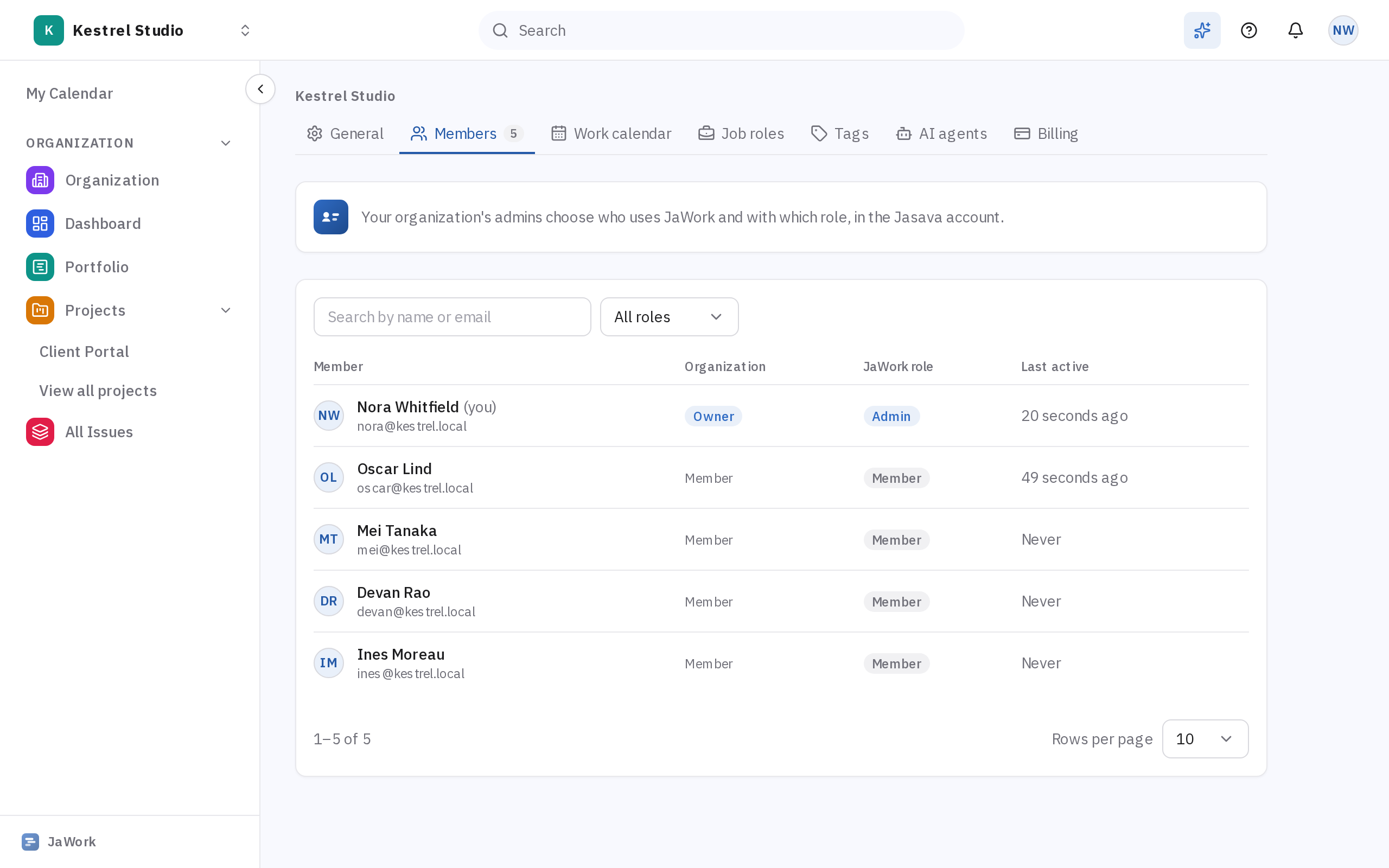
See who uses JaWork
- Click Organization in the menu on the left.
- Open the Members tab. The number beside it counts the people who use JaWork.
Each row shows a person’s name and email, their role in the Organization (Owner, Admin or Member), their JaWork role (Admin or Member) and when they were Last active. Search by name or email, or choose a role in All roles.
For admins, a line at the top says: “People and their apps live in your Jasava account — a change here applies to every Jasava app.”
Find where to manage members
- Click your photo or initials at the top right and choose Organization members.
- Or type “members” or “invite” in the Search box in the header (on a computer). Organization members is the first result.
Both open Organization › Members. Only the organization’s owner and admins see them.
Invite people
- On the Members tab, click Invite people at the top right.
- The Jasava account opens in a new tab, on Invite, with JaWork already chosen.
- Enter their email there and send the invitation.
The person gets an email. Once they accept, they appear on JaWork’s Members tab.
Change or remove someone
Click ⋯ at the end of a person’s row and choose:
- Change role in JaWork — Admin or Member.
- Change apps — which Jasava apps they use.
- Remove JaWork access — they keep their other apps. If JaWork is their only app, the account offers to remove them from the organization instead.
- Remove from organization — from every Jasava app, straight away.
- Open in Jasava account — their page in the account.
Each one opens the Jasava account in a new tab, at that person. Nothing changes until you confirm there. Press Done — close this tab when you have finished; back in JaWork, the Members list updates by itself.
The owner’s row offers only Open in Jasava account.
People who aren’t admins see the list only, with no Invite people and no ⋯.
What the two roles can do
- A Member works in the projects they belong to.
- An Admin also manages the organization in JaWork: its members, work calendar, job roles, tags, AI agents and billing. The owner is always an admin.
Tip: A pending invitation already holds a seat on your plan, so cancel invitations nobody will accept.
Read more about roles in projects and plans and seats.
Was this helpful?
Thank you — it helps us improve the guides.
Still stuck? The assistant answers from these guides, and a person takes over when it can't.
Chat with us