Admin Guide · Automation
Automation rules
1 min read · Updated
Automations do routine work for you, so nobody has to remember it. Each project has its own, on the Configuration tab of its profile. Only project admins change them.
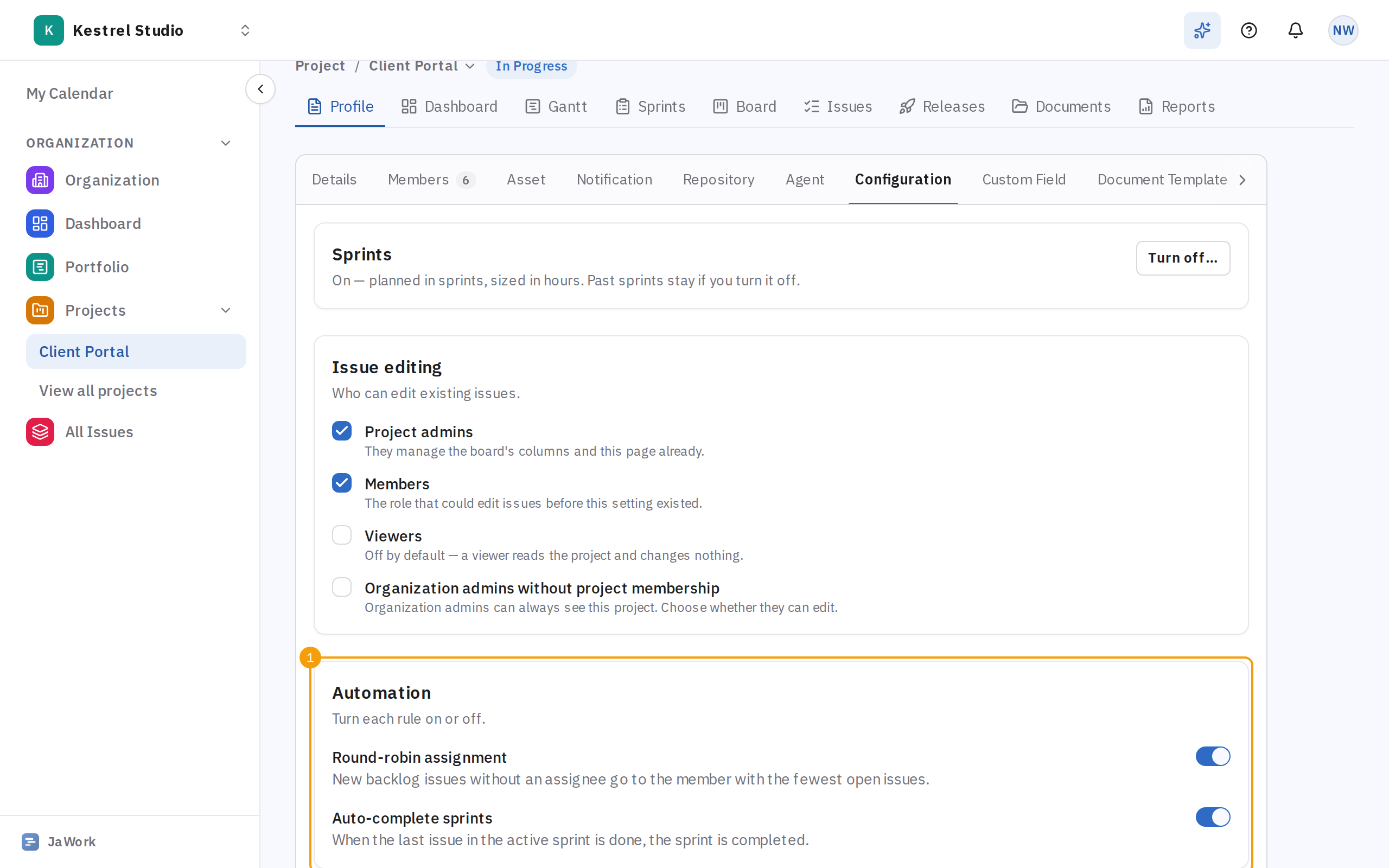
Turn a rule on or off
- Open the project, click Profile and then Configuration.
- Scroll to Automation.
- Click the switch beside a rule. Blue means on.
The rules:
- Round-robin assignment — a new backlog issue with no assignee goes to the member with the fewest open issues.
- Auto-complete sprints — when the last issue in the active sprint is done, the sprint is completed for you.
The other settings on this tab
- Sprints — whether the project plans in sprints, sized in hours. Click Turn off… to stop; past sprints stay.
- Issue editing — who may edit existing issues: Project admins, Members, Viewers, and Organization admins without project membership.
Tip: For work that needs judgement rather than a fixed rule — reviewing, summarising, drafting — put an AI agent on a column.
Read more about planning sprints.
Was this helpful?
Thank you — it helps us improve the guides.
Still stuck? The assistant answers from these guides, and a person takes over when it can't.
Chat with us