User Guide · The board
Swimlanes — group the board into rows
1 min read · Updated
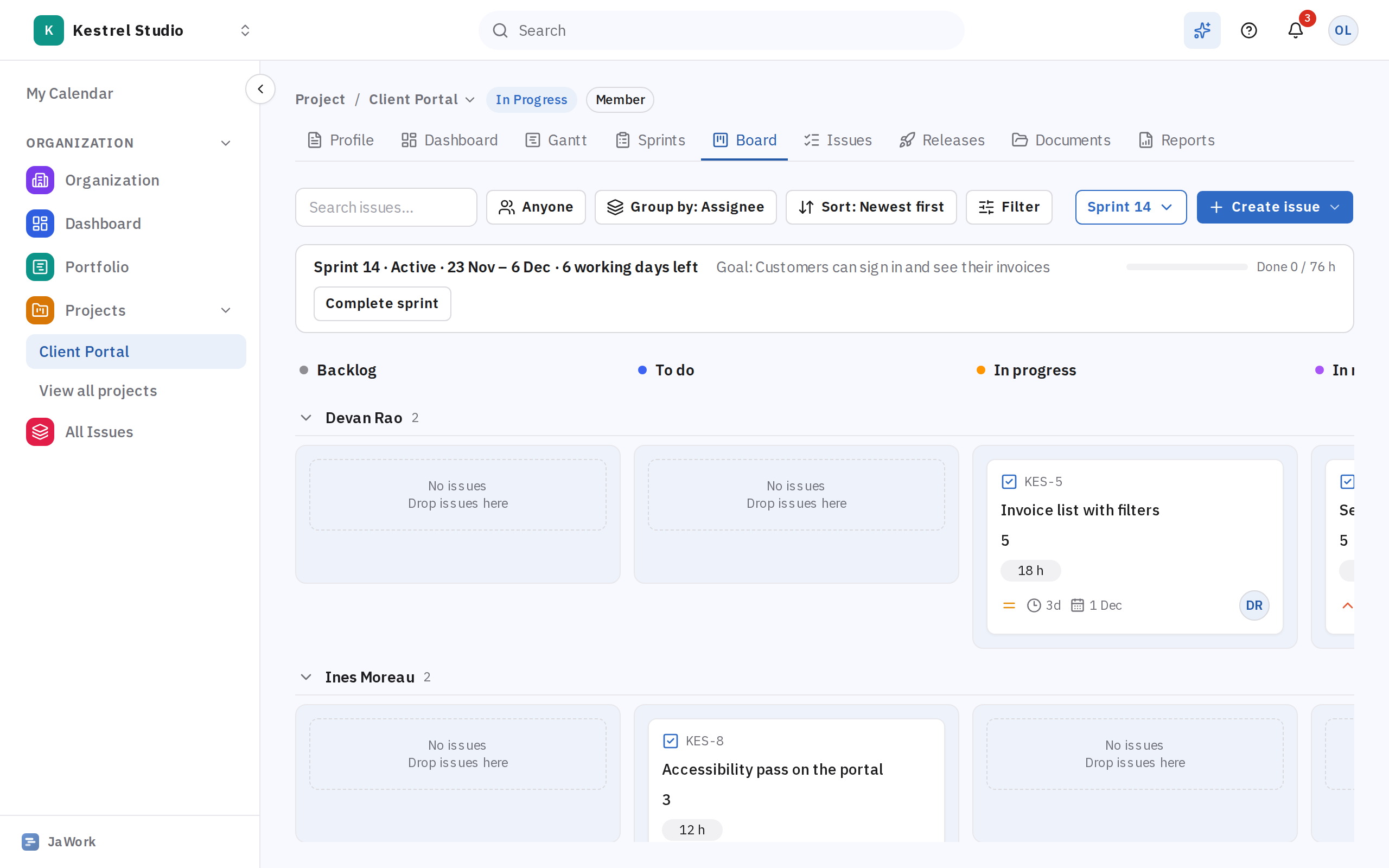
Swimlanes split the board into rows, one row per person, priority or type. The columns stay the same, so you can see at a glance who has what in each status.
Group the board
- On the Board, click Group by.
- Choose what each row is:
- Assignee — a row per person;
- Priority — a row per priority;
- Issue type — tasks, bugs and so on;
- one of your project’s own fields, such as Client.
- The button now reads, for example, Group by: Assignee.
Each row has a header with its name and the number of cards in it. Click the arrow beside it to fold the row away.
Change a value by dragging
Drag a card into another row, and JaWork changes that value for you. With Group by: Assignee, dropping a card in Ines Moreau’s row assigns the issue to her. Drop it in another column of that row, and the status changes too.
Go back to columns only
Click Group by and choose No swimlanes.
Your choice stays on this board until you change it.
Read how to filter the board as well.
Was this helpful?
Thank you — it helps us improve the guides.
Still stuck? The assistant answers from these guides, and a person takes over when it can't.
Chat with us